Inspiration
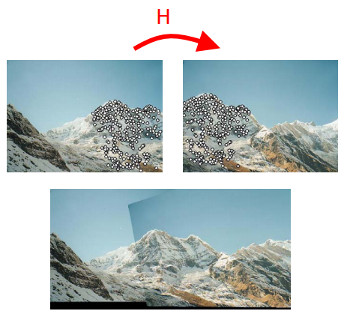
Photos from a turning camera, stitched together
A roof camera drives one loop of a parking lot. Each image is placed on the map with its RTK pose.

Today
- Intrinsics and lens distortion
- Zhang's method: calibrating with a flat target
- Extrinsics and time
- Mosaicing: panoramas and ground maps
Intrinsics: why the spec sheet is not enough
Part 1 of 4
| If this is off | by this much | you get, 10 m away |
|---|---|---|
| Focal length f | 1% (11 px) | depth off by 1%: 10 cm |
| Principal point cx | 10 px | every bearing off by 0.5°: 9 cm sideways |
| Lens distortion, ignored | 0.5%, our “low distortion” lens | 5 px at the image corners |
Lens distortion
xd = x (1 + k1r2 + k2r4 + k3r6) + [2t1xy + t2(r2 + 2x2)], and the same for y
x, y: normalized coordinates (pixels times K−1); r: distance from the center. Radial terms k bend lines; tangential terms t come from a lens not quite parallel to the sensor.
Wide lenses: the fisheye model
A ray at angle θ from the axis lands at distance r from the center:
pinhole: r = f tan θ
fisheye (equidistant): r = f θ
| θ | 30° | 60° | 80° | 89° |
|---|---|---|---|---|
| tan θ | 0.58 | 1.73 | 5.67 | 57.3 |
| θ (rad) | 0.52 | 1.05 | 1.40 | 1.55 |
r / f for each model
plumb_bob
The model above. Fine up to about 100° across. Our 72° lens and the C920 webcams use it.rational_polynomial
8 coefficients, for stronger distortion near the edges.equidistant (fisheye)
For 150° to 200° lenses. OpenCV has a cv.fisheye module for it.Zhang's method: a flat target
Part 2 of 4
The board is a plane, Z = 0. So each photo of it is a homography, exactly as in Lecture 12:
Hi = λ K [ r1 r2 t ]i
From homographies to K
r1 and r2 are columns of a rotation: at right angles, and the same length. With h1, h2 the columns of H and ω = K−TK−1:
h1T ω h2 = 0
h1T ω h1 = h2T ω h2
1Stack the equations
ω is symmetric: 6 numbers. Each view gives 2 equations, so 3 or more views are needed.2Solve V b = 0 with the SVD
The same trick as the DLT. Then K comes out of ω, and each view's R and t out of K−1H.3Refine everything
Nonlinear least squares on K, distortion, and every R and t, to make the reprojection error small: the regression lecture again.Judging a calibration: reprojection error
Push every board corner through the calibrated model, and measure how far it lands from where it was found:
RMS = √ mean ‖ xfound − xmodel ‖2
| Check (the bonus targets) | Target | Must pass |
|---|---|---|
| Intrinsics, each camera | 0.3 px | 0.5 px |
| Stereo calibration | 0.5 px | 0.8 px |
| Rectified rows line up | 0.3 px | 0.5 px |
Try it: calibrate a virtual camera
Photos of the board
A virtual camera whose true K differs from the spec sheet, as real ones do. Board: 8 × 6 corners, 108 mm squares, 1.2 to 3 m away. Closed form only, no distortion.
Good practice for calibration images
Cover the image
Corners in every part of the frame, most of all the corners of the image, where distortion is largest.Tilt it
Up to about 45°, left and right, up and down. Flat-on views add little.Near and far
Across the distances you will use. 20 to 40 good views.Lock the lens
Focus and zoom fixed, taped or set-screwed. Refocusing changes K.Flat and rigid target
A print on foam board bends. Measure the squares with calipers.Sharp images
Hold still, and use even light. Blur and glare move the corners.Calibrating in ROS 2: camera_calibration
# one camera: the classroom webcam
ros2 run v4l2_camera v4l2_camera_node
ros2 run camera_calibration cameracalibrator \
    --size 9x6 --square 0.025 --no-service-check \
    --ros-args -r image:=/image_raw

# the stereo pair on the Mustang: large board,
# 8 x 6 inner corners, 108 mm squares
ros2 run camera_calibration cameracalibrator \
    --size 8x6 --square 0.108 --no-service-check \
    --ros-args -r left:=/stereo/left/image_raw \
-r right:=/stereo/right/image_raw- --size counts inner corners, not squares: an 8 × 6 board has 9 × 7 squares.
- CALIBRATE when the bars are full. Read the error it prints.
- SAVE writes /tmp/calibrationdata.tar.gz: the images and a YAML file per camera.
- The driver loads that YAML from its camera_info_url, and publishes it as CameraInfo with every image.
In the classroom: calibrate a webcam
1Start it
Webcam driver, then the calibrator, with your board's size and square.2Fill the bars
One person moves the board, one watches the bars and the coverage.3Calibrate and save
Write down the RMS error, the number of views, and fx, cx, cy.4Compare
Post your numbers on the board. Same webcam model: how close are the K's?Extrinsics: every transform the rig needs
Part 3 of 4
| Frame (shared names) | Parent | From |
|---|---|---|
| roof_bar | base_link | Team A CAD, tape check |
| stereo_left_optical_frame | roof_bar | CAD, then calibration |
| stereo_right_optical_frame | roof_bar | stereo calibration |
| gnss_antenna | roof_bar | CAD, tape check |
Stereo extrinsics: left to right
With both K's known, photos of the board seen by both cameras at once give R and T from the left camera to the right (cv.stereoCalibrate). Check them:
- |T| matches the bar: 0.500 m in CAD, to a millimeter or two.
- R is close to identity: the cameras are nearly parallel.
- After rectification, matches share a row to 0.3 px.
Bumps
A pothole, or a hand on the bar, can move a camera a fraction of a degree.Refocusing
Changes K, and so the rectification.Heat
Sun on a dark roof bends the bar and softens plastic.Remounting
Every time the rig comes off, check again.Camera to vehicle, and the lever arm
1CAD
Team A's model gives every position and angle on the bar.2Measure
Tape and laser meter from the rear axle center, with a plumb line to the floor and a level on the bar.3Check with a target
Put a target on the floor at a measured spot ahead. Does the camera put it there?A small pitch error moves the ground a lot (camera 1.7 m up)
| Pitch error | 5 m ahead | 10 m ahead | 20 m ahead |
|---|---|---|---|
| 0.2° (target) | 6 cm | 21 cm | 83 cm |
| 0.5° | 14 cm | 53 cm | 2.1 m |
Publishing the transforms
# one static transform from the command line
ros2 run tf2_ros static_transform_publisher \
    --x X_BAR --y 0.0 --z Z_BAR \
    --frame-id base_link --child-frame-id roof_bar

# check the tree
ros2 run tf2_tools view_frames
ros2 run tf2_ros tf2_echo base_link gnss_antenna<joint name="bar_to_left" type="fixed">
<parent link="roof_bar"/>
<child link="stereo_left"/>
<origin xyz="${xl} ${yl} ${zl}" rpy="0 ${pitch} 0"/>
</joint>
<!-- body (x forward, z up) to optical
(z forward, x right, y down) -->
<joint name="left_to_optical" type="fixed">
<parent link="stereo_left"/>
<child link="stereo_left_optical_frame"/>
<origin xyz="0 0 0" rpy="${-pi/2} 0 ${-pi/2}"/>
</joint>Time: when was each image taken?
| Speed | 10 ms off | 50 ms off |
|---|---|---|
| 2 m/s (walking pace in the lot) | 2 cm | 10 cm |
| 10 m/s (36 km/h) | 10 cm | 50 cm |
Position error = speed × time offset. RTK is good to about 2 cm.
Where offsets come from
Stamping an image when it arrives, not when it was exposed. USB transfer, driver queues, and GNSS message delay.How to shrink them
Stamp at exposure (the camera's own timestamp). Keep the laptop clock synced to GNSS time.How to measure what is left
Drive slowly past a line on the ground, both ways. Camera and RTK should place it in the same spot.Mosaicing: panoramas
Part 4 of 4
Why it works
A camera that only turns gives H = K R K−1 for any scene (Lecture 12). Lectures 12 and 13 give every step.Wide panoramas
Past about 120° a flat canvas stretches too much, so stitchers warp onto a cylinder or a sphere instead.Blending, seams, and ghosts
Feathering
Weight each image less toward its edges, so overlaps fade from one to the next.Seams
Cut between images where they agree, not through a car or a face.Exposure
Match the brightness of neighbors first, or the sky shows stripes.Ghosts
A camera that moves, not just turns, sees near things shift: they show up twice.A ground mosaic with RTK
pmap = pbase(t) + R(ψ(t)) · pground, in base_link
Where heading comes from
One antenna gives position, not heading. Take heading from the track (successive fixes, while moving), or from the IMU as in Lab 4.Why it can be sharp
Ground points are exact under the homography, and RTK is good to 2 cm. Everything else is calibration and time.Where the map errors come from
| Source | Example | A point 10 m ahead moves |
|---|---|---|
| RTK position | fixed solution | about 2 cm |
| Heading | 0.5° off | about 10 cm sideways |
| Camera pitch | 0.2° off, or the car braking | about 21 cm along the road |
| Time offset | 50 ms at 4 m/s | 20 cm along the track |
| Lever arm forgotten | antenna 1 m ahead of base_link | 1 m, and the other way on the return pass |
| Not flat ground | curbs, ramps, parked cars | smeared, as in Lecture 12 |
Try it: a map from a driving car
Calibration day plan (M4)
| # | Step | What to do | Pass when | Who |
|---|---|---|---|---|
| 1 | Mount the rig | Bolts checked, pull test by hand, cables clear of the doors | nothing moves when tapped | A |
| 2 | Intrinsics check | Load the classroom YAML files, take a few new views | < 0.5 px | B |
| 3 | Stereo calibration | Large board, near and far, both cameras on one trigger | < 0.8 px; rows < 0.5 px | B |
| 4 | Depth test | Targets at 3, 5, 10, 15 m in the garage, against a tape measure | within 2× theory | B, C |
| 5 | Vehicle and lever arm | CAD, then tape and plumb line, then a floor target | 2 cm, 0.5° | A, B |
| 6 | Record | Bags with images, camera_info, TF, and GNSS, under open sky | verify script passes | C |
Bonus: from the bench to the car
Team A: Mount
- M3: printed parts fit the bar
- CAD numbers into the transforms table: the starting point for every transform
Team B: Calibration
- M3: intrinsics done in the classroom, YAML files in the repo
- M4: run today's procedure on the mounted rig
Team C: ROS 2
- M3: one launch file runs both cameras on a laptop
- M4: load the YAML files, publish the TF tree from the URDF, record
Readings (free)
- OpenCV: Camera Calibration and the stitching API
- ROS 2 Jazzy: camera_calibration, with the stereo calibration tutorial
- Zhengyou Zhang, A Flexible New Technique for Camera Calibration, the original paper
- Shree Nayar, First Principles of Computer Vision: the videos on camera calibration and image stitching. fpcv.cs.columbia.edu
- Richard Szeliski, Computer Vision: Algorithms and Applications, 2nd ed.: Chapter 8 (alignment and stitching) and Section 11.1 (calibration). szeliski.org/Book
- Robotics 101 interactive explainer: Homography and Image Mosaicking
- The two demos and their notebooks on the course site: calib_zhang and ground_mosaic
Three takeaways
Next
Lecture 15: [[ LECTURE 15 TOPIC ]]
For the bonus: M3 on the bench, then M4 on the Mustang.