Inspiration
What a camera on our Mustang's roof sees
The same pixels, rearranged by one 3 × 3 matrix

Today
- Cameras as sensors
- The pinhole model
- Homography
- Estimating and using H
Cameras as sensors
Part 1 of 5
| Sensor | Gives you | Weak at | Cost |
|---|---|---|---|
| Camera | Millions of measurements per frame: color, texture, lane lines, signs, lights | No depth from one camera; darkness, glare, rain | Low |
| Lidar | Direct 3D points, day or night | Sparse; cannot read signs or lane color | High |
| Radar | Range and speed, through rain and fog | Coarse shape | Medium |
| GNSS and IMU | Where the car is (Labs 1 to 3) | Nothing about what is around it | Low to medium |
What is in a camera
Our sensor
Sony IMX430: 1616 × 1240 pixels, each 4.5 µm. The chip is 7.27 × 5.58 mm.Color, the cheap way
Each pixel sees only red, green, or blue (a Bayer filter). The driver fills in the other two colors.Our lens
5 mm focal length, f/2.8, under 0.5% distortion. It never needs refocusing beyond 10 cm.Interactive explainer: Images as Arrays and Color Spaces
Field of view and focal length
On our 7.27 mm wide sensor:
| Lens | f in pixels | Horizontal FOV | One pixel at 10 m |
|---|---|---|---|
| 3.5 mm | 778 px | 92° | 1.3 cm |
| 5 mm (ours) | 1111 px | 72° | 0.9 cm |
| 8 mm | 1778 px | 49° | 0.6 cm |
| 12 mm | 2667 px | 34° | 0.4 cm |
Global and rolling shutter
Our Blackfly S is global shutter
The whole image is exposed together, so a moving car, a turning car, and stereo pairs all stay consistent.Motion blur still happens
blur (px) = speed × exposure × f / distance. At 2 m/s, 5 ms, 10 m away: 2 × 0.005 × 1111 / 10 = 1.1 px.
The pinhole model
Part 2 of 5
Similar triangles
x / f = X / Z ⇒ x = f X / Z
Twice as far looks half as big. Dividing by Z is the step that loses depth.
A real lens behaves like a pinhole, plus a little distortion (Lecture 13). The image is upside down; we draw the plane in front to keep it upright.
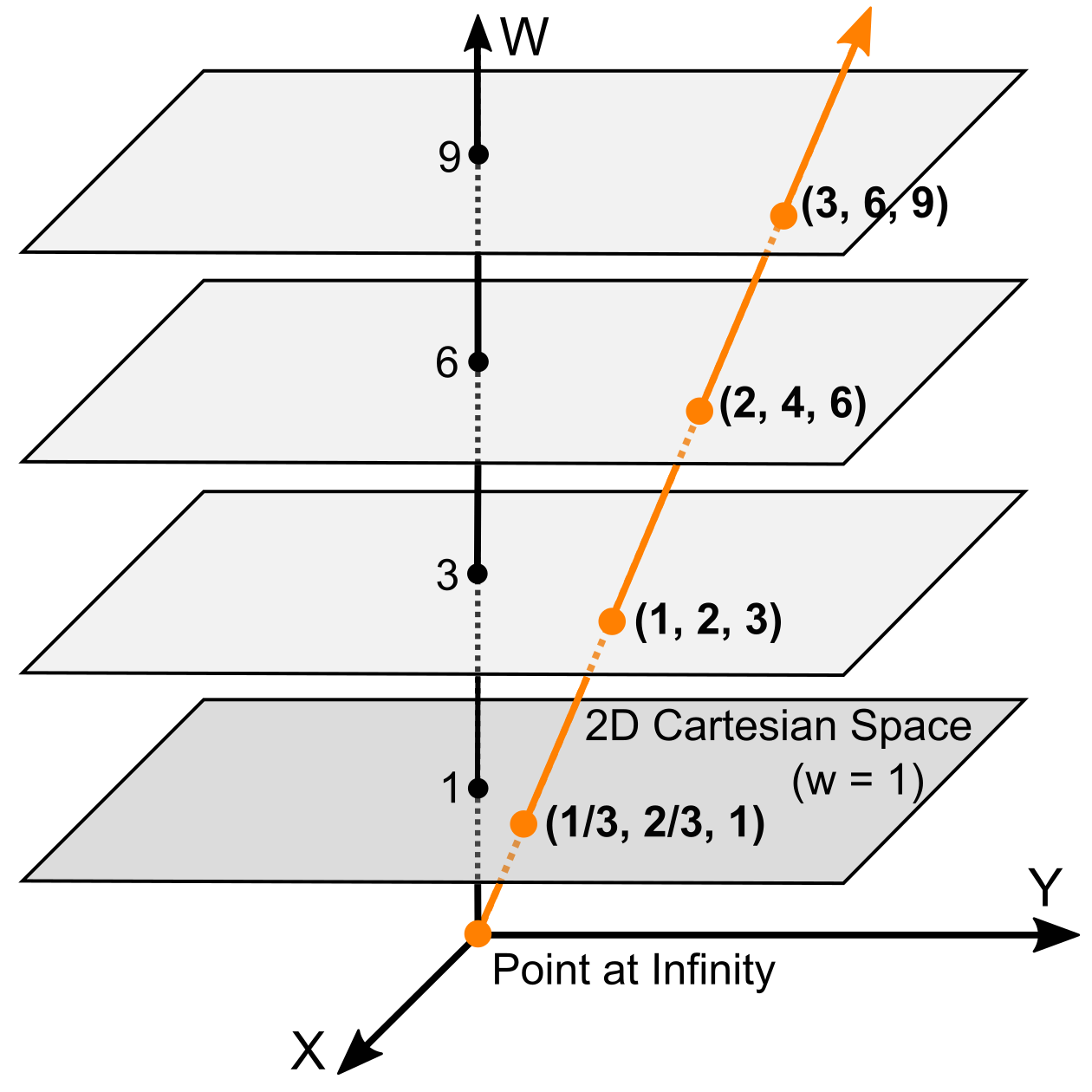
Homogeneous coordinates
Add one more number, and agree that a point does not change when you scale all of them:
(u, v) → [u, v, 1] ∼ [2u, 2v, 2] ∼ [wu, wv, w]
Division becomes a matrix
The pinhole divides by Z. In homogeneous coordinates projection is a plain matrix product, and you divide by the last entry at the very end.Back to pixels
[a, b, c] means the pixel (a / c, b / c). This one rule turns every result back into numbers you can plot.Points at infinity
[x, y, 0] is a direction, not a point: where parallel lines meet. That is why lane lines meet at the horizon.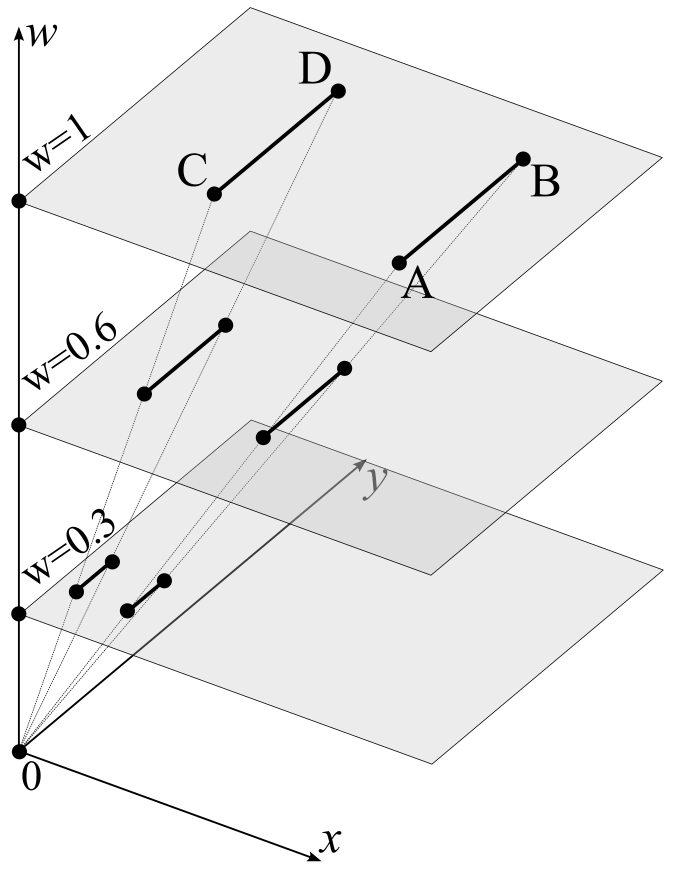
The intrinsic matrix K
| fx | s | cx |
| 0 | fy | cy |
| 0 | 0 | 1 |
| fx, fy | focal length in pixels (equal for square pixels) |
| cx, cy | principal point: where the optical axis hits the sensor |
| s | skew, zero for modern cameras |
| xc, yc, zc | the 3D point in the camera frame, in meters: xc right, yc down, zc forward along the optical axis (its depth) |
Our camera, on paper
| 1111 | 0 | 808 |
| 0 | 1111 | 620 |
| 0 | 0 | 1 |
 Image: Le Hoang An. Click for the source page.
Where the camera is: R and t
P = K [ R | t ] (a 3 × 4 matrix)
Extrinsics: R and t
Where the camera sits and points. They change when you remount it. Team B measures them on the car.Intrinsics: K
The camera's own geometry. Fixed for a given lens and focus.Camera frames in ROS
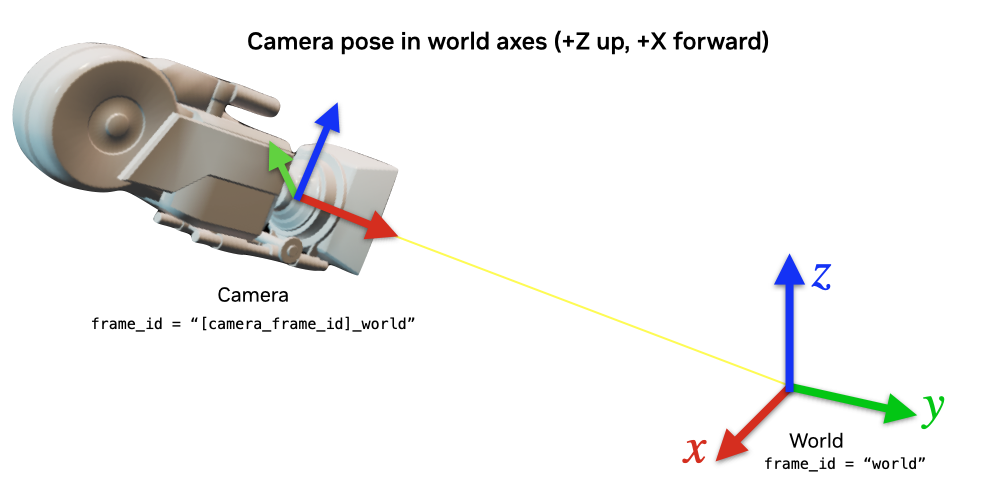
Robots use x forward, z up. Images use z forward (along the axis), x right, and y down (rows grow downward). Both are ROS conventions.
A camera looking straight ahead
| 0 | −1 | 0 |
| 0 | 0 | −1 |
| 1 | 0 | 0 |
CameraInfo: the camera in a message
# sensor_msgs/msg/CameraInfo (the fields you will fill)
std_msgs/Header header       # frame_id: stereo_left_optical_frame
uint32 height                # 1240
uint32 width                 # 1616
string distortion_model      # "plumb_bob"
float64[] d                  # distortion: k1, k2, t1, t2, k3
float64[9] k                 # intrinsics K, row by row
float64[9] r                 # rectification rotation (stereo)
float64[12] p                # projection matrix P = K' [R | t]
uint32 binning_x
uint32 binning_y
- k is today's K, written as 9 numbers.
- d is the lens distortion (Lecture 13).
- r and p line up a stereo pair (Lecture 12).
- The driver publishes it next to every image, loaded from the YAML file that calibration writes.
Try it: aim the roof camera
Homography
Part 3 of 5
Put every point on the ground, Z = 0. The third column of P multiplies zero and drops out:
[u, v, 1]T ∼ K [ r1 r2 r3 t ] [X, Y, 0, 1]T
= K [ r1 r2 t ] [X, Y, 1]T
9 numbers, 8 degrees of freedom
Scaling H changes nothing (homogeneous coordinates), so it has 8 free numbers.It goes both ways
H−1 takes pixels back to the ground. That is the bird's-eye view.Where homographies show up
Bird's-eye view
Ground pixels to a top-down map: lanes, parking stalls, curbs.Document scanning
A tilted photo of a page made flat and square.Sports broadcasts
The first-down line drawn on the field from a moving camera.Panoramas
Stitch photos from a camera that only turns (Lecture 13).Two cases, and only two, where one H relates two images
1. The scene is a plane
Any two views of the ground, a wall, or a calibration board.2. The camera only rotates
H = K R K−1, for any scene. Move the camera, and near and far things shift by different amounts: no single H fits.The family of 2D transforms
| Transform | Free numbers | What it keeps | Example |
|---|---|---|---|
| Translation | 2 | everything but position | sliding a photo |
| Rigid (Euclidean) | 3 | lengths and angles | a robot driving on a map |
| Similarity | 4 | angles and length ratios | zoom plus rotate |
| Affine | 6 | parallel lines | a far-away view of a plane |
| Projective (homography) | 8 | straight lines only | any camera view of a plane |
Estimating and using H
Part 4 of 5
One point pair (X, Y) ↔ (u, v) gives two equations:
u (h31X + h32Y + h33) = h11X + h12Y + h13
v (h31X + h32Y + h33) = h21X + h22Y + h23
Count
8 unknowns, 2 equations per pair: 4 pairs.Careful
No three of the four points on one line, or the equations collapse.Linear
The equations are linear in the h's: no iteration needed.Interactive explainer: Homography and Image Mosaicking
The direct linear transform (DLT)
- Write the two equations of each pair as two rows of a matrix A, so that A h = 0 with h the 9 entries of H.
- With n pairs, A is 2n × 9.
- Take the SVD of A. The last row of VT (smallest singular value) is h.
- Reshape to 3 × 3 and scale so h33 = 1.
def dlt(src, dst):
    """H with dst ~ H src, from 4+ pairs."""
    Ts, Td = normalizer(src), normalizer(dst)
    s, d = apply_h(Ts, src), apply_h(Td, dst)
    rows = []
    for (x, y), (u, v) in zip(s, d):
        rows.append([-x, -y, -1, 0, 0, 0, u*x, u*y, u])
        rows.append([0, 0, 0, -x, -y, -1, v*x, v*y, v])
    _, _, Vt = np.linalg.svd(np.array(rows))
    Hn = Vt[-1].reshape(3, 3)
    H = np.linalg.inv(Td) @ Hn @ Ts
return H / H[2, 2]Noisy clicks: use more points
Fit H from clicks with random error (0.5, 1, or 2 px), then check corners that were not used for the fit, up to 16 m away.
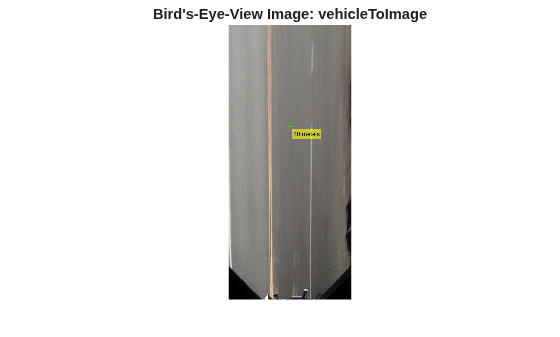
Bird's-eye view
Also called inverse perspective mapping. For every pixel of the top-down image:
1Pick the ground point
The pixel's row and column are a position (X, Y) in meters.2Find it in the camera
(u, v) = H [X, Y, 1]: where that ground point shows up.3Copy the color
Read the camera pixel there, with interpolation, and paint it.Why work backward?
Going forward from each camera pixel leaves holes in the map. Going backward fills every map pixel exactly once.Two ways to get H
From K and the measured mounting (R, t), or from four or more marked points on the ground, as in the next demo.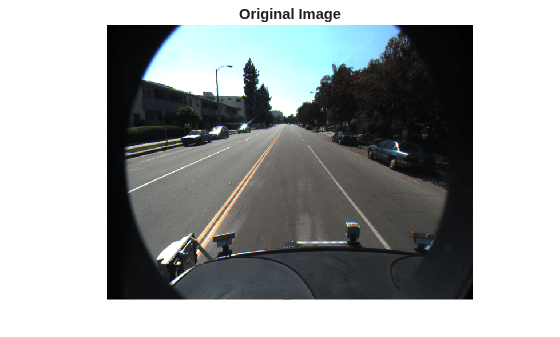
Try it: four points to a bird's-eye view
Drag corners 1 to 4 onto the stall in the camera image (left). The right side is the bird's-eye view from your H, with 1 m grid lines; red dashes show where the stall really is. Python demo and notebook
When the ground is not flat
H assumes every pixel is on the ground. Anything taller gets smeared far away in the bird's-eye view:
- cars, people, poles, curbs
- ramps and hills (the garage ramps)
- the car pitching when it brakes, which changes R
Measuring on the ground
One pixel on the ground, for our camera 1.7 m up:
| Distance ahead | Across | Along the ground |
|---|---|---|
| 5 m | 0.5 cm | 1.5 cm |
| 10 m | 0.9 cm | 5.4 cm |
| 20 m | 1.8 cm | 21 cm |
| 40 m | 3.6 cm | 85 cm |
along ≈ (X² + h²) / (h f) across ≈ X / f
The ground gets squashed
Far away, one pixel row covers tens of centimeters of road. Distance along the road is the hard direction.Mount higher, see better
Raising h shortens the along-ground footprint. That is one reason the rig goes on the roof.Readings (free)
- Shree Nayar, First Principles of Computer Vision: the short videos on image formation and image stitching. fpcv.cs.columbia.edu
- OpenCV: Basic concepts of the homography explained with code
- Richard Szeliski, Computer Vision: Algorithms and Applications, 2nd ed.: Chapter 2 (image formation) and Section 8.1 (2D alignment). szeliski.org/Book
- MathWorks: Transform a road image to a bird's-eye view, with code
- Wikipedia: Random sample consensus (RANSAC), a preview of Lecture 13
- Robotics 101 interactive explainers: The Pinhole Camera Model, Images as Arrays and Color Spaces, and Homography and Image Mosaicking
- The two demos and their notebooks on the course site: pinhole_camera and homography_dlt
Three takeaways
Next
Lecture 13: Sensing with Cameras: Feature Detection, Stereo
How to find the four points automatically, and how two cameras measure depth.