Inspiration

- Clips onto a manual wheelchair
- 250 W motor, up to 10 km/h
- About 25 km per charge
- Swappable battery
- About 8 kg
Think about it: what battery would you pick for it, and how big?

Biweekly Agenda
- IMU
- Meet our Mustang Mach-E
- No class on 10/12
- Battery, Power Design, System Design
Deadlines
- Quiz for Lab 2, 10/08
- Lab3, 10/19

Today
- Robots as Systems
- Li-ion Battery
- Battery Management System (BMS)
- System Design
Robots as Systems
Robots as Systems
FRC: FIRST Robotics Competition

Robots as Systems
TurtleBot 4 Architecture

Common Sensors for Robotics
Sensors
Sensors
Contact Sensors
Switches
Sensors
SensorHumidity sensorPressure SensorLight SensorGas Sensor
Sensor
Common Sensors for Robotics
Application Specific
Integrated Circuit
Sensors
Sensors
Contact Sensors
Sensors
Common Compute Unit for Robotics
CX7000
(MCUs)
Computers
(SBCs)
32GB+ RAM/
Ubuntu etc.
Reduced Instruction
Set Computer
FPGA =
Field Programmable
Gate Arrays


(MCUs)
Computers
(SBCs)
Common Compute Unit for Robotics
Common Actuators for Robotics
motorServo motorStepper motor
Actuators
actuator


Actuators
Common Actuators for Robotics
Robots as Systems
Power sources
Where the energy goes
A mobile robot

25.6 V, 20 Ah
512 Wh
sensing, SOC


How batteries work

How a battery works
Discharge: powering the robot
- The anode gives up electrons (oxidation).
- Electrons flow through the wire and do work.
- The cathode takes them in (reduction).
- Ions cross the electrolyte to balance the charge.
- Runs on its own (spontaneous).
Charge: rechargeable cells only
- A charger pushes the electrons back.
- Both reactions run in reverse.
- Needs outside energy (not spontaneous).
Lithium-ion battery
Read more: https://ul.org/research-updates/what-are-lithium-ion-batteries/
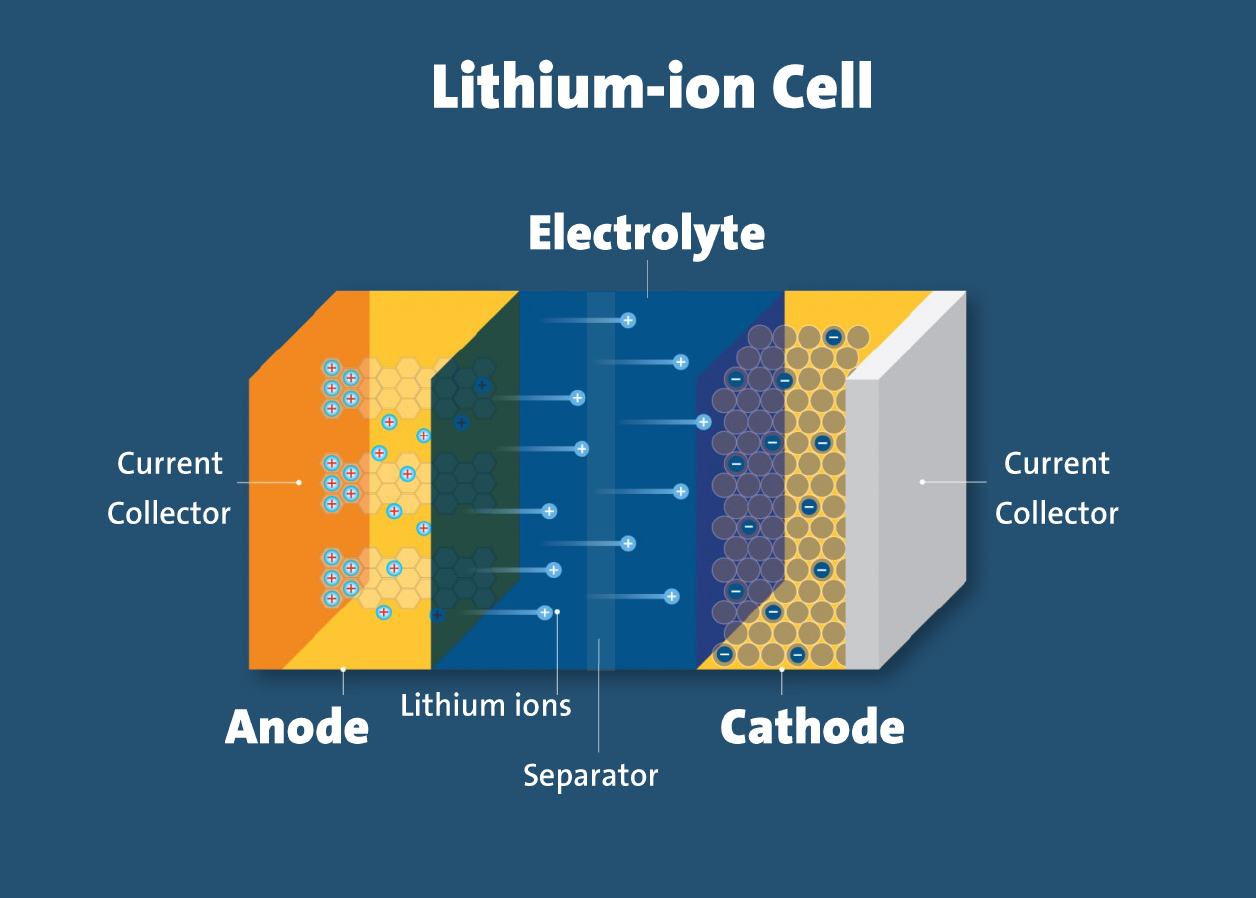
Lithium-ion battery
How does it work?

Common kinds of batteries
How Li-ion reached the market
Layered TiS₂ cathode stores lithium ions in its gaps (intercalation).
Problem: lithium whiskers grow on charging, short the cell, start fires.
Cobalt oxide cathode (LiCoO₂) nearly doubles the voltage.
Gain: about 4 V; cells can be built uncharged, then charged.
Carbon anode (petroleum coke) holds the lithium as ions too.
Gain: no lithium metal, so it survives a drop-weight test.
Li-ion vs LiPo
Lithium-ion (hard case)
- Cylinder or rectangle with a strong shell
- A bit heavier, often higher capacity
- Hard to puncture
- Used in laptops and large packs
Lithium polymer (soft pouch)
- Thin rectangle in a silvery bag
- Lighter, often smaller capacity
- Easy to dent or puncture
- Fits thin devices and small drones
Know your voltages
| Printed on cell | Full charge | Notes |
|---|---|---|
| 3.7 V | 4.2 V | Almost all LiPo cells today |
| 3.6 V | 4.1 V | Older chemistry |
| Newer cells | 4.35 V | A little more energy, mostly laptop cylinders |
- Match the charger to the cell.
- A 4.2 V charger on a 4.1 V cell overcharges it: damage or fire.
- A 4.35 V cell on a 4.2 V charger is safe, just not quite full.
Five rules for every lithium cell
- Never charge above the maximum voltage (about 4.2 V)Protection board
- Never discharge below the minimum voltage (about 3.0 V)Protection board
- Never draw more current than it can supply (about 1 to 2C)Protection board
- Never charge faster than it can take (about 1C)Protection board Charger
- Charge only in a safe temperature range (about 0 to 50 °C)Charger, sometimes
What a BMS does
- MeasureEvery cell voltage, pack current, temperature
- ProtectOpen the switch on over- or under-voltage, over-current, or heat
- BalanceKeep all cells at the same charge level
- EstimateState of charge (SOC) and state of health (SOH)
- ReportSend the numbers to the robot over a data link
How does a BMS work?

Bigger packs: don’t build your own
What to do instead
- Need more capacity? Buy one bigger cell.
- Need a pack? Buy one factory-assembled.
- Factories test and sort cells by machine, so every cell in a pack matches in capacity and internal resistance.
- Hobbyists can't match cells that well.
Try it: build a battery pack
Cells
Robot
Try a problem
Example cells, typical values: NMC 3.6 V, 3.0 Ah, 10 A, 47 g each. LiFePO4 3.2 V, 3.0 Ah, 9 A, 85 g each. Runtime ignores converter losses.
Cell balancing
| Passive balancing | Active balancing | |
|---|---|---|
| How | Burns extra charge from the fullest cells as heat in a resistor | Moves charge from fuller cells to emptier ones |
| Cost | Simple and cheap | More parts, more cost |
| Energy | Wastes the extra energy | Keeps most of it |
| Used in | Most small and medium packs | Large packs, such as EVs |
How full? How worn out?
State of charge (SOC): how full now
- Voltage lookup: simple, but the curve is flat in the middle (very flat for LiFePO4).
- Coulomb counting: add up current over time. Small errors build up, like dead reckoning.
- Fuel gauge chips combine both, resetting the count when the cell rests.
State of health (SOH): how worn out
- Full capacity today divided by capacity when new.
- Packs are often called worn out near 80%.
- Aging also raises internal resistance, so voltage sags more.
# sensor_msgs/msg/BatteryState (excerpt)
float32   voltage          # V
float32   temperature      # deg C, NaN if not measured
float32   current          # A, negative when discharging
float32   charge           # Ah left right now
float32   capacity         # Ah when full, today
float32   design_capacity  # Ah when full, when new
float32   percentage       # 0 to 1, not 0 to 100
uint8     power_supply_status
uint8     power_supply_health
float32[] cell_voltage     # one entry per cell
ros2 interface show sensor_msgs/msg/BatteryState. SOH ≈ capacity / design_capacity.Try it: how long will it last?
Robot
Battery
Simple model of NMC-type cells from Battery University BU-808 trends: cycles to 70% depend on depth of discharge (300 at 100%, 1,000 at 40%, 2,000 at 20%); each 0.1 V lower charge roughly doubles cycles but stores less; aging about doubles per 10 °C above 25 °C (rule of thumb). Calendar aging is ignored.
Charging and handling
Charging
- Use a lithium charger. A 4.2 V charger fits almost every Li-ion and LiPo cell.
- Keep the charge rate at or below 1C: no more than 500 mA for a 500 mAh cell.
- Simple USB chargers deliver about 500 mA, and their rate is set by a resistor.
- Hobby chargers have no temperature sensor. Above 0.5C, or when charging outdoors, use a temperature-aware charger.
Handling
- Keep cells away from heat, direct sun, and hot cars.
- Never short, puncture, crush, or solder directly to a cell.
- Don't carry loose cells with keys, coins, or other metal.
- Tape the terminals before storage or disposal.
- If a cell smells, heats up, swells, or changes color, stop using it and unplug it.
Thermal runaway

- Damage, overcharge, or heat
- The cell heats itself
- Gas, smoke, and fire
- Neighbor cells follow
Interactive: UL Xplorlabs thermal runaway
Regular vs RC batteries
| Regular cellsPhones, cameras, most projects | "RC" cellsRC cars, planes, drones | |
|---|---|---|
| Protection | Built-in protection circuit | Often raw cells, no protection |
| Current | About 1 to 2C | Up to about 20C |
| Life | 500+ charge cycles | Shorter when pushed hard |
| When empty | Cuts off to save itself | Never cuts off, to keep the vehicle flying |
| Price | Higher | Lower, since there is no circuit |
Choosing a Li-ion chemistry
| Lithium-ion type | Volts per cell | Energy (Wh/kg) | Cycle life | Runaway onset | Strong point | Typical use |
|---|---|---|---|---|---|---|
| Cobalt (LCO) | 3.6 V | 150 to 200 | 500 to 1,000 | 150 °C | High energy | Phones, laptops |
| NMC | 3.6 to 3.7 V | 150 to 220 | 1,000 to 2,000 | 210 °C | Good all-rounder | E-bikes, EVs, many robot packs |
| NCA | 3.6 V | 200 to 260 | 500 | 150 °C | Highest energy | Some EVs |
| Iron phosphate (LFP) | 3.2 to 3.3 V | 90 to 120 | 2,000+ | 270 °C | Safety and long life | Fleets, energy storage |
| Titanate (LTO) | 2.4 V | 50 to 80 | 3,000 to 7,000 | Very safe | Cold and fast charge | Special uses, high cost |
- LiPo is a package (Slide 22), not a separate chemistry. Most use a cobalt or NMC-type mix inside.
- Don't charge any Li-ion below freezing. Cold charging plates lithium on the anode.
From mission to battery
- Mission: runtime, distance, payload, temperature
- Power: average and peak watts (power budget)
- Energy: watt-hours, with margins for usable range and aging
- Voltage: cells in series to suit motors and regulators
- Current: peak amps, then check the C-rate
- Chemistry: mass, cycle life, safety, cost
- Recharge plan: dock, swap, or charge by hand
Example: indoor delivery robot
Drones: the mass spiral
Why more battery stops helping
- Hover power grows faster than mass (about mass1.5).
- Each extra kilogram of battery must also lift itself.
- Tripling the battery from 1 to 3 kg adds only about 27% (25 to 32 min).
- Past about twice the airframe mass, more battery means less flight time.
- A 0.6 kg lidar drawing 12 W cuts 25 min to 18 min.
Battery-aware robots
How much to keep in reserve?
- The reserve depends on distance to the dock, so a fixed threshold is only a start.
- Nav2 has a docking server for the final approach.
import rclpy
from rclpy.node import Node
from rclpy.qos import qos_profile_sensor_data
from sensor_msgs.msg import BatteryState

RESERVE = 0.30   # head home below 30 %

class BatteryWatch(Node):
    def __init__(self):
        super().__init__('battery_watch')
        self.create_subscription(BatteryState, '/battery_state',
                                 self.on_battery, qos_profile_sensor_data)

    def on_battery(self, msg):
        if msg.percentage < RESERVE:
            self.get_logger().warn(f'Low battery: {msg.percentage:.0%}')

def main():
    rclpy.init()
    rclpy.spin(BatteryWatch())

if __name__ == '__main__':
    main()
Match the battery to the robot
| Robot | Energy source | Runtime | How it recharges | What drives the choice |
|---|---|---|---|---|
| Small quadrotor | LiPo, high C-rate | About 15 to 30 min | Swap packs by hand | Mass above all |
| TurtleBot 4 | 26 Wh Li-ion, 14.4 V | 2.5 to 4 h (manual) | Drives onto its dock | Low cost, simple to use |
| Boston Dynamics Spot | Li-ion pack | About 90 min | Self-charging dock | High power for walking |
| UBTECH Walker S2 | Swappable Li-ion packs | About 3 min down per swap | Swaps its own battery | Uptime in a factory |
| NASA Perseverance | Nuclear MMRTG (about 110 W) plus two 43 Ah Li-ion batteries | Years | MMRTG charges the batteries nonstop | No sun needed; batteries cover peaks up to 900 W |
Two ways to keep robots running
Dock: the robot drives to a charger
Swap: the robot changes its own battery
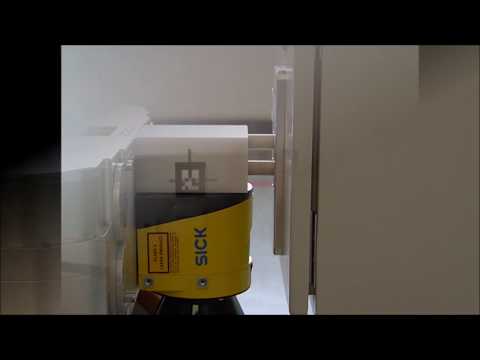

Simple, but the robot is idle while it charges. Nav2 has a docking server for the last meter.
Only about 3 minutes of downtime, but you pay for extra packs and the swap station.
Cost per cycle, not per pack
Cost per kWh delivered
- The pricier pack is cheaper to own if you really use the extra cycles.
- Example prices only. Plug in real quotes.
Free ways to make any pack last longer
- Shallow cycles: using less of the range per cycle adds cycles.
- Keep it cool: heat ages cells fastest.
- Store it half charged in a cool place, not full.
- Don't sit at 100% longer than needed.
- Buy known cells with real datasheets from trusted sellers.
Three takeaways